
How Twitch Streaming Works: The Technology Behind Video, Audio, and Live Broadcasting
By James Park · · 11 min read
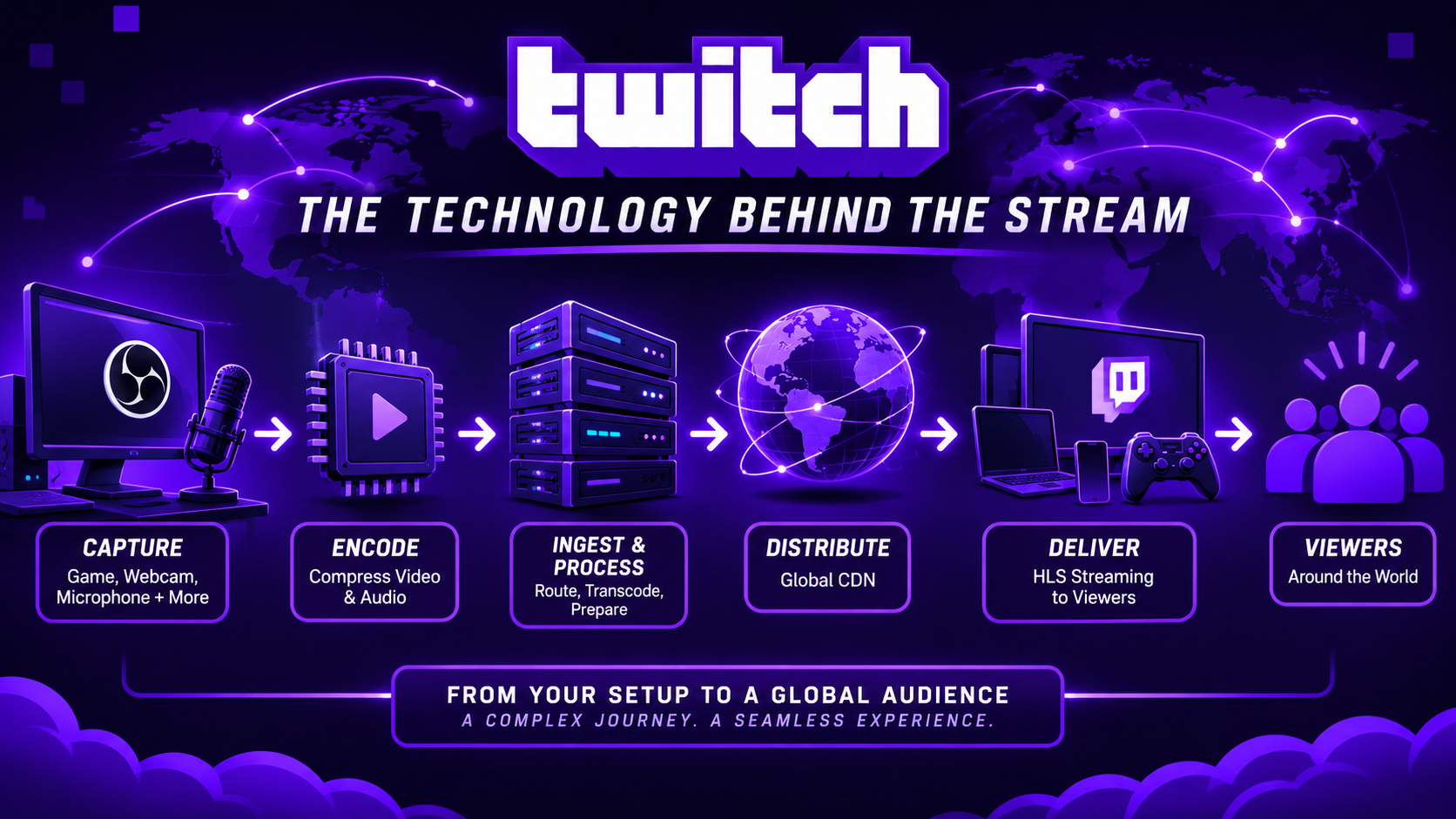
Behind the Stream: How Twitch Actually Processes, Transmits, and Delivers Video and Audio
What really happens when you press Go Live? A look inside Twitch's streaming infrastructure, video encoding, audio processing, servers, and global delivery network.
When you open OBS, launch your favorite game, turn on your microphone, and press the Go Live button, it might feel like you're simply sending a video feed to Twitch.
But behind that seemingly simple action is an incredibly sophisticated technical operation involving video encoding, audio compression, networking protocols, geographically distributed servers, transcoding, and content delivery networks.
Every second, Twitch must receive thousands of individual broadcasts, process them, convert them into different quality levels, and deliver them to potentially millions of viewers around the world.
So what actually happens behind the scenes?
Let's break down the technology that makes Twitch work.
1. It Starts With Your Computer: Capturing Video and Audio
Before Twitch ever receives your broadcast, your computer has to capture and assemble everything you're sending.
Streaming software such as OBS Studio, Streamlabs, and XSplit acts as the control center for your broadcast.
Your streaming setup typically combines several sources:
-
Game capture: The video coming directly from your game.
-
Webcam: Your camera feed, often displayed as an overlay.
-
Microphone: Your voice, captured through an external or built-in microphone.
-
Desktop audio: Sounds coming from your computer, including games, music, and applications.
-
Additional sources: Alerts, browser sources, animations, graphics, and other overlays.
Your streaming software combines these sources into a single broadcast composition.
Think of OBS as a miniature television production studio. It takes all your individual inputs, layers them together, mixes the audio, and prepares the final output for transmission.
But raw video and audio files are enormous. Sending uncompressed footage over the internet would require an impractical amount of bandwidth.
That's where encoding comes in.
2. Video Encoding: Turning Your Gameplay Into a Stream
Video encoding is one of the most important parts of the entire streaming process.
Your computer captures a series of images, or frames, and an encoder compresses that information into a format that can be transmitted efficiently.
There are two common encoding approaches Twitch streamers encounter:
Software Encoding (x264)
This uses your computer's CPU to compress video.
It can produce excellent image quality, but encoding can consume significant processing power. If your CPU is already working hard running a demanding game, software encoding can potentially affect your gaming performance.
Hardware Encoding (NVIDIA NVENC, AMD, and Intel)
Hardware encoding uses dedicated encoding capabilities built into your graphics hardware or processor.
For many gaming streamers, this is an attractive option because it reduces the amount of work being handled by the CPU.
Modern GPUs can produce impressive streaming quality without requiring your main processor to handle the entire encoding workload.
What do resolution, FPS, and bitrate actually mean?
These three settings have a major impact on the quality of your broadcast.
| Setting | What it controls |
|---|---|
| Resolution | How many pixels make up your video |
| FPS | How many frames are displayed per second |
| Bitrate | How much data is transmitted every second |
For example, a 1080p60 stream delivers 1,920 × 1,080 pixels at 60 frames per second.
That's a lot of visual information to process and transmit.
A higher bitrate can preserve more detail, particularly in fast-moving games, but it also requires more upload bandwidth.
This is why a fast-moving game such as Call of Duty can be more challenging to stream cleanly than a relatively static game.
Twitch generally recommends using Constant Bitrate (CBR) for traditional broadcasting because consistent data delivery helps maintain predictable playback quality.
3. Audio Encoding: How Your Voice Gets to Viewers
Video usually gets most of the attention, but audio is just as important.
Your microphone captures an analog sound wave. Your audio interface or computer converts that signal into digital audio, which your streaming software then processes.
OBS can combine multiple audio sources, including:
-
Your microphone.
-
Game audio.
-
Desktop audio.
-
Music and sound effects.
-
Discord or other voice communication.
These sources can be adjusted independently before being included in the final broadcast.
Audio is then compressed using an audio codec so it can be transmitted efficiently.
AAC-LC is one commonly used audio format in Twitch broadcasting, with stereo and mono configurations supported.
Why does audio compression matter?
Imagine a streamer broadcasting for four hours with thousands of viewers. Sending completely uncompressed audio would require substantially more bandwidth and infrastructure.
Compression reduces the amount of data required while maintaining sound quality that is suitable for live streaming.
Why audio synchronization matters
Have you ever watched a stream where someone's mouth moves before you hear their voice?
That's an audio-video synchronization problem.
Your video and audio are separate streams of information that must maintain accurate timing throughout the broadcast.
If one gets delayed relative to the other, viewers notice immediately.
Streaming software uses timing information to keep these signals aligned, while the streaming platform and playback system must preserve that synchronization as the broadcast travels through the network.
4. RTMP: The Technology That Sends Your Stream to Twitch
<escape>RTMP (Real-Time Messaging Protocol)</escape> is one of the foundational technologies behind traditional Twitch broadcasting.
Once OBS has encoded your video and audio, it sends the broadcast over the internet to a Twitch ingest server using RTMP.
Think of RTMP as the delivery system between your computer and Twitch.
Your broadcast travels through your internet connection and reaches an entry point in Twitch's infrastructure.
That entry point is called an ingest server.
Twitch operates geographically distributed points of presence (PoPs), which help streamers connect to its network efficiently.
The goal is to get your broadcast into Twitch's network with a reliable connection and minimal unnecessary delay.
This is also why choosing an appropriate ingest server can sometimes improve stream stability.
Your stream key helps Twitch identify and authorize your broadcast.
Importantly, your stream key should never be shared publicly. Anyone with access to it could potentially broadcast to your channel.
5. Inside Twitch's Infrastructure: Ingest, Processing, and Transcoding
This is where things get particularly interesting.
Once your broadcast reaches Twitch, the platform has to prepare it for potentially thousands or even millions of viewers.
Twitch doesn't simply take your original video feed and send the exact same file to everybody.
Instead, it uses a sophisticated processing system.
There are three major stages:
Stage 1: Ingest
Twitch receives your incoming broadcast through its distributed network.
Its infrastructure identifies the stream and routes it toward the appropriate processing resources.
Twitch has described an internal system called Intelligest, which helps intelligently route incoming broadcasts between its geographically distributed points of presence and origin data centers.
This allows Twitch to manage computing resources and network capacity more efficiently.
Stage 2: Transcoding
Once your stream reaches an origin data center, it can be processed into multiple video quality levels.
This is called transcoding.
For example, your original 1080p60 broadcast may be converted into several different versions:
-
1080p
-
720p
-
480p
-
360p
-
Lower-resolution options where supported
Why create all these versions?
Because not everyone watching your stream has the same internet connection or device.
Someone watching on a powerful gaming PC with fiber internet might select 1080p60.
Someone watching on a phone with a weaker mobile connection might need 480p.
Transcoding allows Twitch to provide different viewing experiences without requiring every viewer to download your original high-bitrate broadcast.
Stage 3: Distribution
After processing, Twitch distributes the video through its global content delivery infrastructure.
This allows viewers in different geographical locations to access the broadcast without every individual connection having to travel directly to the original processing server.
Twitch has publicly described a distribution architecture using geographically distributed data centers organized into a replication tree.
Essentially, your stream gets distributed throughout the network so that viewers can access it efficiently.
6. HLS: How Your Stream Gets Delivered to Viewers
Here's another important technical distinction.
While RTMP is commonly used to send your broadcast into Twitch, Twitch has historically used HTTP Live Streaming (HLS) for video playback.
HLS works differently from a traditional continuous video connection.
Instead of simply delivering one uninterrupted video file, the system divides the broadcast into smaller media segments and provides playlists that tell the playback software which segments to request.
Your browser, mobile app, or console requests these segments and plays them in sequence.
This architecture offers several advantages:
-
Adaptive video quality.
-
Compatibility with different devices.
-
Efficient distribution through content delivery networks.
-
Better handling of changing internet conditions.
-
The ability to support enormous audiences.
It also helps explain why Twitch streams aren't always perfectly real-time.
There is processing time involved in encoding, transmitting, transcoding, segmenting, distributing, buffering, and playing the video.
All of these steps contribute to the delay between the streamer doing something and the viewer seeing it.
7. Why Is There a Delay Between the Streamer and the Viewer?
Latency is one of the biggest technical challenges in live streaming.
Imagine you're playing a competitive game and your audience sees something happen several seconds after it actually occurred.
That delay is the result of multiple processes working together.
Some of the biggest contributors include:
-
Encoding: Your computer needs time to compress the video.
-
Upload: The broadcast must travel from your home network to Twitch.
-
Processing: Twitch receives and prepares the stream.
-
Distribution: The video is delivered through Twitch's network.
-
Buffering: The viewer's device temporarily stores video data to prevent interruptions.
-
Playback: The video is decoded and displayed.
Twitch has invested considerable engineering resources into reducing these delays.
Its low-latency streaming infrastructure is designed to balance responsiveness with reliable playback.
There is always a trade-off: reducing buffering can make the experience more immediate, but it can also make playback more vulnerable to network interruptions.
8. What Happens When 10,000 People Watch Your Stream?
This is where the scale of Twitch becomes particularly impressive.
Let's use a hypothetical example.
Imagine you're streaming at 6 Mbps and suddenly attract 10,000 concurrent viewers.
If every viewer receives a 6 Mbps stream, the combined downstream delivery rate would be approximately:
60,000 Mbps, or 60 Gbps.
That's an enormous amount of data being delivered simultaneously.
And that's just one hypothetical broadcast.
Now imagine thousands of creators streaming simultaneously, each with different resolutions, bitrates, and audience sizes.
This is why Twitch needs a global infrastructure consisting of ingest servers, processing data centers, distribution systems, and extensive networking capacity.
It also explains why content delivery networks are so important.
Rather than forcing one server to individually deliver every video segment to every viewer, distributed infrastructure helps deliver content closer to the people watching.
The result is a system capable of supporting enormous audiences across the world.
9. What Happens When Your Stream Ends? VOD and Storage
When you stop broadcasting, the technical process doesn't necessarily end.
If you have enabled Twitch's VOD storage features, Twitch can retain a recording of your broadcast.
Its video-on-demand infrastructure stores generated media segments and associated information, allowing viewers to watch the broadcast later.
Streamers can also create highlights and clips from their content.
This creates an entirely different set of technical challenges.
Live video is time-sensitive. It needs to arrive quickly.
VOD content has different requirements. It needs to be stored, indexed, retrieved, and delivered efficiently whenever someone wants to watch it.
Twitch therefore needs systems that handle both live delivery and long-term content management.
For creators, this is what makes it possible to turn a live broadcast into additional content for YouTube, social media, and other platforms.
10. What Does All This Mean for Everyday Twitch Streamers?
You don't need to understand distributed server architecture to become a successful Twitch streamer.
However, understanding the technical side can help you make smarter decisions about your setup.
Here are some practical takeaways:
1. A stable upload connection matters more than chasing maximum bitrate.
A consistent stream is generally better than a higher-quality stream that constantly drops frames.
2. Your encoder choice matters.
Hardware encoding can help preserve CPU resources while gaming, depending on your system and encoder generation.
3. Audio quality is just as important as video quality.
Viewers might tolerate slightly lower video resolution, but consistently poor microphone audio can drive them away.
4. Resolution isn't everything.
A stable 720p60 stream can provide a better experience than an unstable 1080p60 broadcast.
5. Understand your stream health.
Twitch Inspector can help identify connection issues, bitrate fluctuations, and other broadcasting problems.
The more you understand your broadcast settings, the easier it becomes to troubleshoot issues before they affect your audience.
Final Thoughts: The Engineering Behind Every Twitch Broadcast
When you press Go Live, you're initiating a complicated chain of technical operations that most viewers never think about.
Your computer captures and encodes video and audio. That data travels through RTMP to Twitch's ingest infrastructure, where it gets routed, processed, transcoded, and distributed around the world.
HLS playback systems then help deliver the appropriate video quality to viewers across different devices and internet connections.
All of this happens continuously, often with thousands of other broadcasts being processed simultaneously.
The next time you watch a Twitch stream, remember that what you're seeing isn't simply a video being uploaded to a website.
It's the result of an enormous global engineering operation working behind the scenes to make live entertainment possible.
That's the technology behind the stream.
Article by StreamerCalc — Helping Twitch creators understand streaming, monetization, and the technology behind building a successful channel.
Estimate your Twitch earnings
Try the free StreamerCalc calculator →